
Tweet to Image Generator
Turn any tweet or quote into a polished 1200 × 800 image — perfect for cross-posting to Instagram, LinkedIn and newsletters. Paste the text, set the author, pick dark or light theme, download a PNG. Free forever, no account needed, and your words never leave your browser.
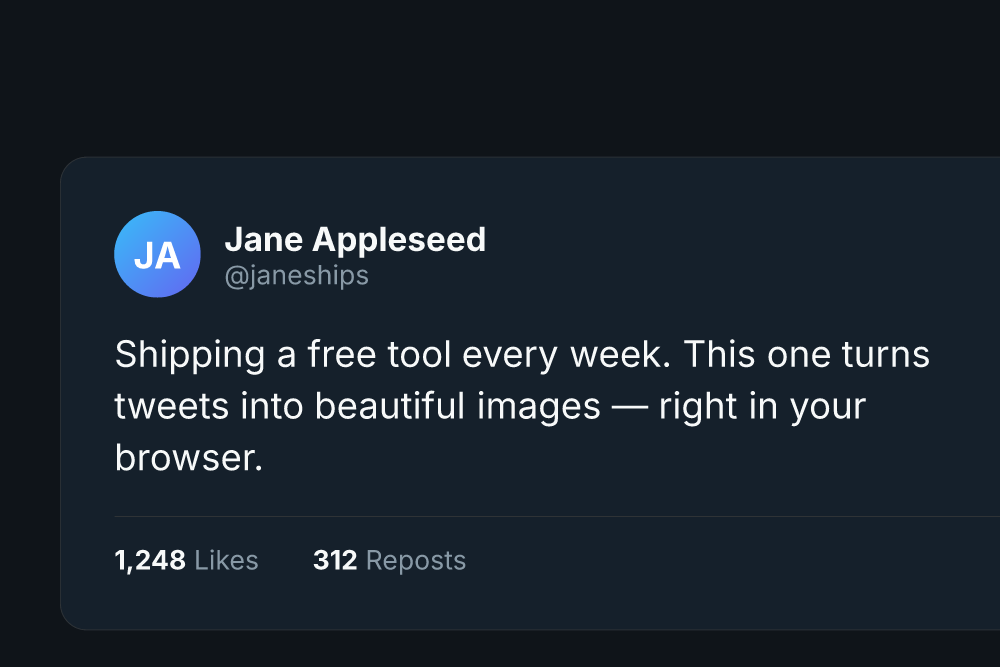
Rendered at 1200 × 800 px. Everything runs in your browser — your text never leaves this page.
How it works
- Paste the text — the tweet or quote, up to 280 characters.
- Set the author — name, handle, avatar color and theme, previewed live.
- Download the PNG — a crisp 1200 × 800 file, ready to share anywhere.
Specifications
| Output size | 1200 × 800 px · 3:2 aspect ratio |
|---|---|
| Formats | PNG · SVG |
| Text limit | Up to 280 characters, typed or pasted by you |
| Data source | None — the tool never fetches from X and needs no X login, so it also works for deleted or protected posts |
| Avatar | Initials circle generated from the author name — no photo upload |
| Themes | Dark and light, plus eight tweet-card styles in the template library |
| Rendering | Entirely in your browser — your text is never uploaded |
| Cost | Free, unlimited, no watermark, no account |
Good to know
This generator outputs clean cards at 1200 × 800 px (3:2), exported as PNG or SVG. Because you type or paste the text yourself, the tool never connects to X: no login, no fetching, nothing leaves your device. It works just as well for deleted, archived or protected posts that scrapers cannot reach.
- Recreated, not a screenshot: the card is a deliberate recreation, free of app UI, timestamps and engagement counters — sharper and cleaner than a phone screenshot.
- Privacy-first input: up to 280 characters, entered manually, with zero account access required.
- Initials avatar: the profile image is a badge generated from the author name you set — no photo upload needed.
- Two themes: dark and light, to match wherever the card will be posted.
Frequently asked questions
What size are the generated images?
Every image is rendered at 1200 × 800 pixels — a versatile size that looks sharp on Instagram, LinkedIn, X and in email newsletters.
Do I need to upload a profile picture?
No. The avatar is a stylish initials circle generated from the author name — nothing is uploaded, so your data stays private.
Can I automate image generation with an API?
Not yet. Click the Get API button above the preview to see what the future API request will look like and join the beta waitlist for 500 free credits per month at launch.
Is this an actual screenshot from X?
No — it is a clean recreated card, not a screenshot of the X app. That is why it stays sharp and free of app UI, timestamps and engagement counters. You type or paste the text, so you control the final wording and spacing.
Can I turn a long thread into an image?
Each card holds up to 280 characters to keep the layout balanced. Split a thread into one card per post and publish the set together as a carousel or slide sequence.
Can I use someone else's tweet?
The card keeps the author's name and handle on the image by design, so attribution travels with it. Use it for commentary, curation and sharing — and never edit the text in a way that misrepresents what the author said.
Next steps
More free tools
OG Image Generator · Certificate Maker · Testimonial Cards · Podcast Cover Maker · YouTube Thumbnail Maker · Color Palette Generator